
Print Production
Fully integrated print production with InDesign without compromising on design
Advantages of print production
crossbase Print Production in Detail
Language Change
The following procedures are available for language changes:
Language Mutation
Image and text frames are identical across the different language layers of a document. This allows only the black plate to be replaced during printing, which reduces costs. A prerequisite for this is that the assortment is identical for all countries.
Language Variant
Here, too, the assortment is identical for all countries. However, the foreign-language texts are longer than those in the master catalog and, due to the break in the page layout, affect image placement and, in some cases, page numbers. Therefore, separate documents are created for each language.
Country Variant
The content differs from the master catalog because the assortments and content are country-specific.
Language Mixer
Unlike the other versions, publications created using this method contain multiple languages. The formatting and placement of the individual languages are controlled by configurable instructions.
Text Overflows
Text overflows, such as those in foreign languages, can be automatically corrected:
- If a text overflow is detected, the text can be reduced in size using predefined adjustments. Adjustable settings include, for example, horizontal or vertical scaling, as well as font size and line spacing.
- A threshold value is set to determine the limit up to which certain parameters may be adjusted. This helps preserve the overall appearance as much as possible.
- If text overflows still occur, they can be manually corrected in the layout. If this is still insufficient, the text content or translation must be adjusted as a last resort. To better illustrate the issue, the overflows are highlighted in color.
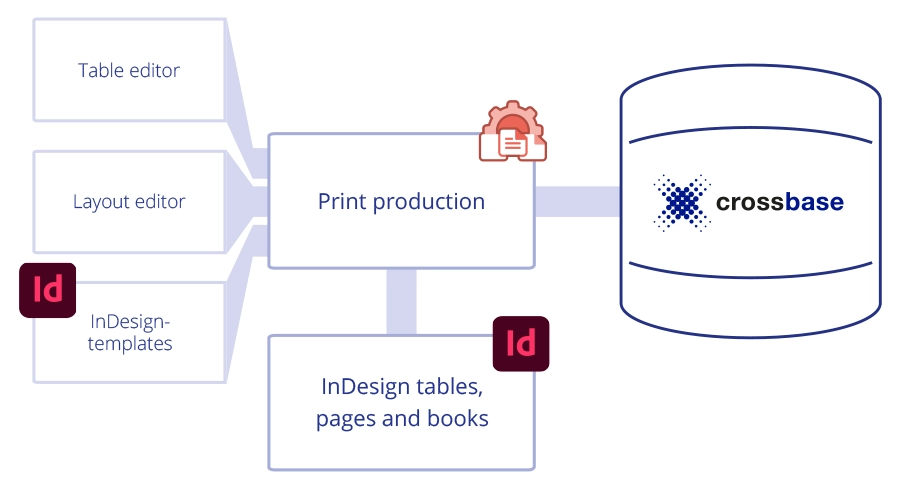
The components of crossbase Print Production are fully integrated. Layout and content are strictly separated from one another.
The InDesign Print Engine
With the InDesign Print Engine, you can automatically generate your next catalog or upcoming brochure based on a layout you've designed.
The InDesign Data Sheet Engine
With the crossbase InDesign Data Sheet Engine, you can create data sheets in bulk. You handle the design; crossbase takes care of the rest.
I look forward to a personal
consultation with you.
Call now at
+49 7031 9880-770
or write a message
Herby Tessadri
Sales Manager